
Suppliers can be removed from the Supplier Circle in two ways—either by deleting them or by uninviting them.
The available option depends on the current status of the project.
The available option depends on the current status of the project.
Case 1: Project Status = In Setup
In this stage, suppliers can be deleted.
They will not receive any invitation to the project.
Steps to Delete a Supplier
- Open the project.
- Go to Supplier Circle.
- Find the supplier you want to remove.
- Click the arrow next to their name.
- Click Delete.
Important
- If the supplier has substitute users, passive users, or helping suppliers, all of them will be removed automatically.
Case 2: Project Status = Online, In Analysis, or Closed
In these stages, suppliers cannot be deleted, but they can be uninvited.
Once uninvited, they will no longer have access to the project or its current tenders/phases.
Steps to Uninvite a Supplier
- Open the project.
- Go to Supplier Circle.
- Find the supplier you want to uninvite.
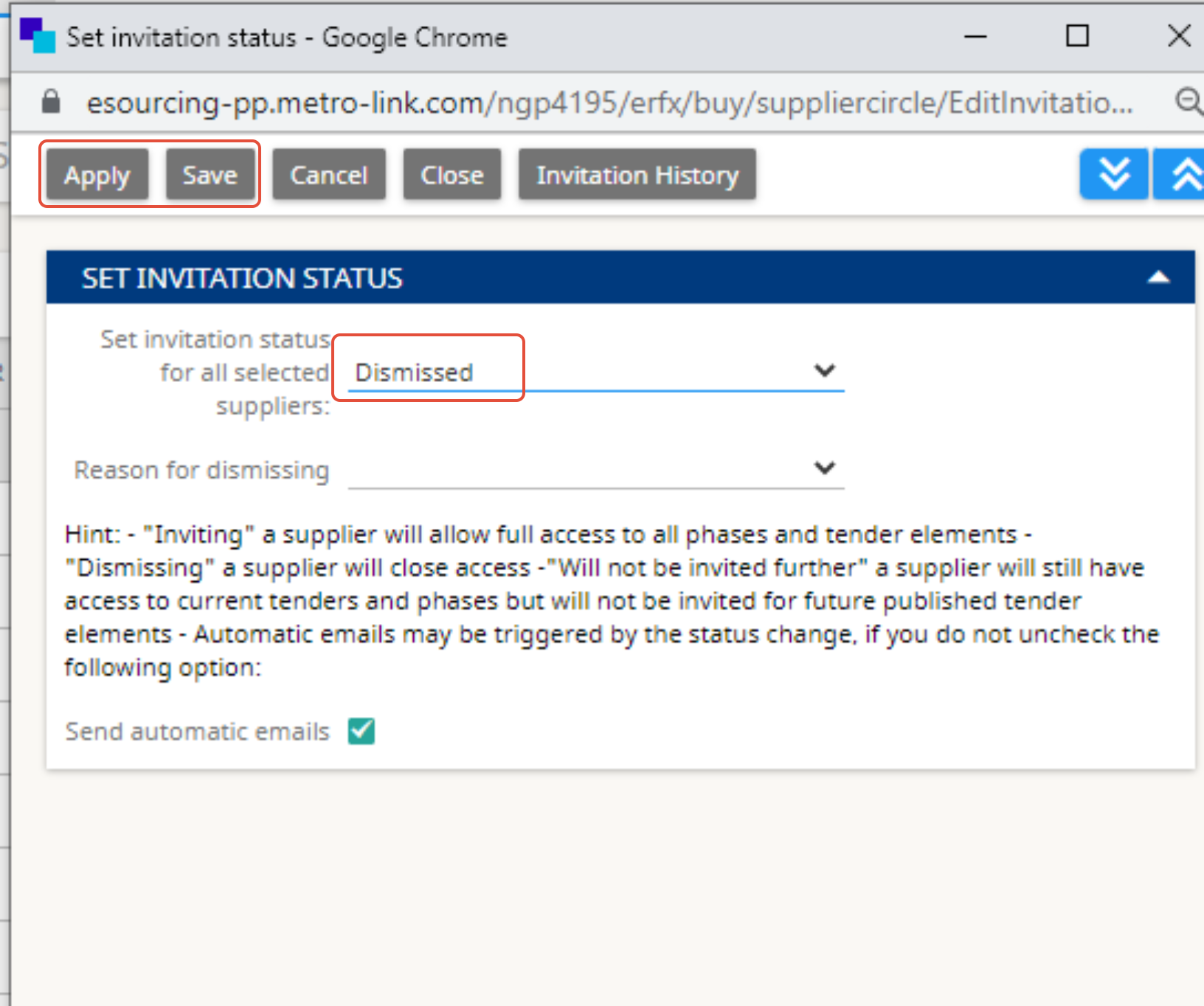
- Click Set Invitation Status for that supplier.
- In the pop-up window, select Dismissed.
- Click Save, then Apply.
What Happens Next
- The supplier’s status will change from Invited / Accepted to Dismissed.
- If the supplier has substitutes, passive, or helping suppliers, all related users will also be uninvited.


For any further questions do not hesitate to contact us.